How to Watch Porn Privately (Incognito Isn’t Enough)
Incognito mode only hides your history from people who use your device. Here's what actually keeps watching porn private, from your phone to your internet provider.
Incognito mode is the thing everyone reaches for, and it's also the thing most people misunderstand. It stops your browser from saving history on your device. That's all. Your internet provider, your employer's network, the websites themselves and anyone with access to your accounts can still see plenty.
Here's what actually keeps your porn habits private, layer by layer, in plain English.
Short answer: use a private window (and lock it on your phone), keep porn in a separate browser or profile, run an ad blocker, and use a trustworthy VPN if you don't want your internet provider to see which sites you visit. Never watch on a work device or network.
Who can see what
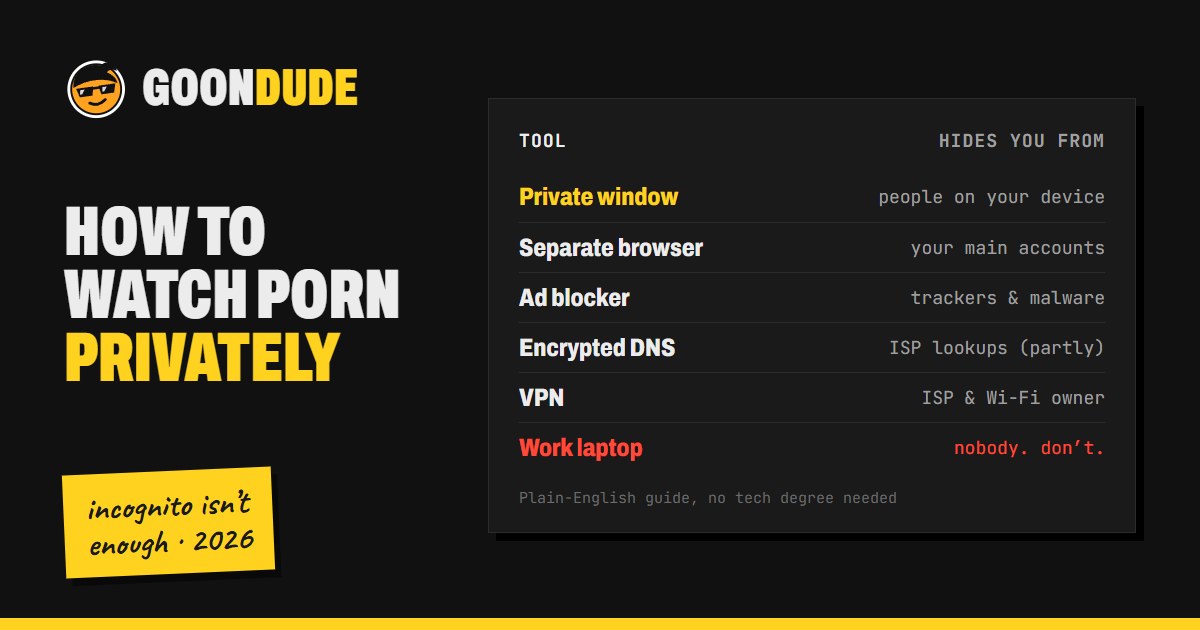
Different tools hide different things. Most people only need the first three.
| What you use | Hides it from | Doesn't hide it from |
|---|---|---|
| Private / incognito window | People who use your device later | Your internet provider, your network owner, the websites |
| Separate browser or profile | Your everyday accounts, autofill and search suggestions | Your internet provider, the websites |
| Ad blocker | Ad trackers, malicious pop-ups | Your internet provider, the websites |
| Encrypted DNS | Your internet provider's DNS logs (partly) | The VPN or DNS company you choose, the websites |
| VPN | Your internet provider and the Wi-Fi network | The VPN company, the websites, anything you log into |
1. Use a private window, and lock it
A private or incognito window doesn't save your history, cookies or form entries once you close it. That's the right tool for keeping things off a shared computer or phone.
On phones, you can now lock private tabs behind Face ID, a fingerprint or your passcode, so someone borrowing your phone can't just open them:
- Safari on iPhone: Settings → Apps → Safari → turn on Require Face ID to Unlock Private Browsing (or Touch ID on older models).
- Chrome on iPhone and iPad: Chrome Settings → Privacy and Security → Hide Incognito Tabs (the wording varies by version). Locked tabs are also blurred in the tab switcher.
What it doesn't do: private mode doesn't hide your IP address, doesn't stop sites from seeing you, and doesn't hide anything from your internet provider or network.
2. Keep porn in a separate browser or profile
The most common way people get caught isn't hacking. It's a search suggestion, an autofilled URL, or a logged-in account. Fix that by giving porn its own space:
- Use a different browser than your everyday one, or a separate profile in the same browser. Firefox is a good choice: it has strong privacy settings and container tabs that keep sites separated.
- Don't sign into your Google, Apple or Microsoft account in that browser, so nothing syncs to your other devices.
- Turn off search suggestions and history sync there, so nothing shows up when someone else types in your main browser.
- Watch out for logged-in searches. If you sign into your Google or Microsoft account, even inside a private window, your searches can be saved to that account's history and show up on your other devices.
3. Run an ad blocker
Free porn sites are funded by ads, and some of those ads are trackers, fake "virus detected" pop-ups or worse. uBlock Origin is free, open source and blocks almost all of it. Install it before you visit any free tube. It's the single biggest safety upgrade for watching porn online.
4. Decide how much your internet provider should see
Even with HTTPS (the padlock), your internet provider can see which websites you connect to, just not what you do on them. That's because the site name is visible when your browser looks it up and when it starts the connection.
You have three options, from least to most private:
- Encrypted DNS. Turn on "secure DNS" or "DNS over HTTPS" in your browser settings. This hides your lookups from your provider, but the DNS company you pick sees them instead, and the site name can still leak at the start of the connection. Firefox and Chrome both support a newer fix for that (Encrypted Client Hello), but only some websites support it so far.
- A VPN. A VPN sends all your traffic through an encrypted tunnel, so your provider and whoever runs the Wi-Fi only see that you're connected to a VPN. The trade-off is that the VPN company can now see what your provider used to see, so pick one with a strong no-logs track record. Mullvad and Proton VPN are the two we recommend.
- Tor Browser. Maximum privacy, but slow, and many video sites block it or barely work. It's overkill for most people.
Never watch on work or school devices or networks. They're often monitored, and a VPN doesn't help if the device itself is managed by your employer.
5. Keep accounts and payments separate
If you sign up anywhere or pay for a site:
- Use a separate email address that isn't tied to your name.
- Use a unique password (a password manager makes this easy). Adult sites have been breached before.
- Check the billing name. Most adult sites bill under a discreet company name rather than their own, and the descriptor is usually shown at checkout. Look before you pay if a shared bank statement is a concern.
- Consider a virtual card. Many banks offer virtual or single-use card numbers, which keep your real card number off the site.
6. Be careful with age verification
In many places, adult sites are now required to verify your age, often by asking for a photo ID or a selfie. That data is a target: in 2025, Discord said around 70,000 users' ID photos may have been exposed through a third-party age-check vendor.
- Prefer methods that don't upload documents, such as on-device age estimation, when a site offers a choice.
- Check who the verification company is and whether it says it deletes your data.
- Avoid unknown sites that ask for ID out of nowhere. That's a common scam.
7. Phones, TVs and shared devices
- Give everyone their own user account on shared computers and tablets.
- Downloads and screenshots end up in your photo library or Downloads folder. On iPhone, the Hidden album can be locked with Face ID.
- Notifications from adult apps or sites can pop up on your lock screen. Turn them off.
- Be careful casting to a TV. Smart TVs, streaming sticks and voice assistants can keep their own history.
What not to do
- Don't use "free premium" or leak sites. They're the biggest source of malware, and they hurt real creators.
- Don't install "players," "codecs" or browser extensions that a porn site asks you to install. Real video sites play in your browser.
- Don't reuse your main email or password on adult sites.
- Don't rely on incognito alone to hide anything from your network or provider.
FAQ
Does incognito mode hide porn from my internet provider?
No. Incognito only stops your browser from saving history on your device. Your internet provider can still see which sites you connect to. A VPN hides that from your provider.
Can the person who owns the Wi-Fi see what I watch?
They can usually see which sites you connect to, but not the pages or videos themselves, because of HTTPS. A VPN hides even the site names from them.
Do I need a VPN to watch porn privately?
Not to keep it off your device. Private mode and a separate browser do that. You need a VPN if you don't want your internet provider or the network owner to see which sites you visit.
Can porn sites see who I am in incognito mode?
They can see your IP address and roughly where you are, but not your name, unless you log in, pay or upload ID. A VPN hides your real IP address from the site.
What's the safest way to watch free porn?
Stick to the big, well-known tubes, run an ad blocker, never install anything a site asks you to, and skip leak and "free premium" sites. Our free porn tube rankings only list sites we consider safe.
Want the tools in one place? See our privacy tools list for the browser, ad blocker and VPNs we recommend.